How to Use Counting Jack
A quick walkthrough of the card counter from first card to final payout.
Select Your Cards
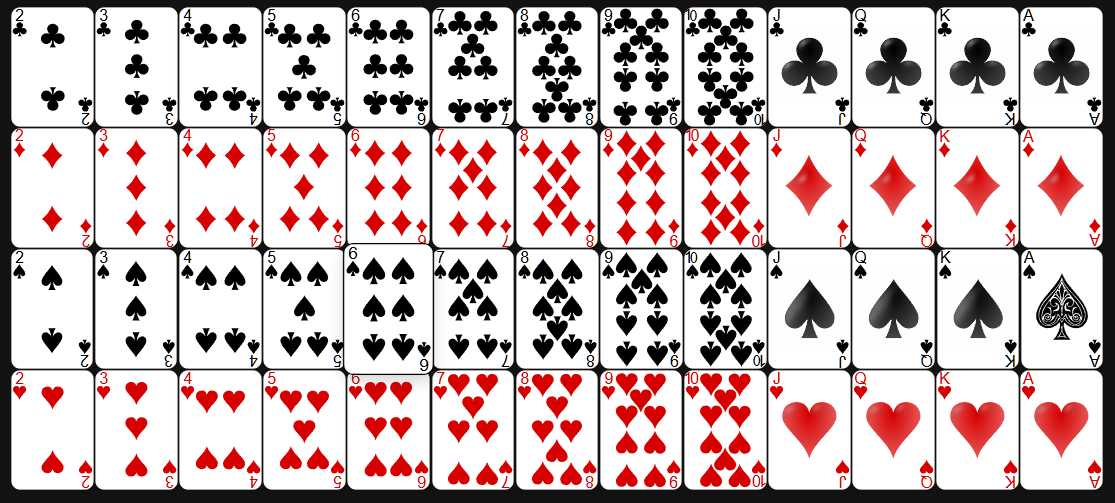
As cards are dealt at the table, click each one in the card grid to log it. Track every card you can see — both the player's hand and the dealer's visible cards. The more cards you record, the more accurate the count becomes.
Cards are organized by suit across four rows. Simply click a card to add it to the current round. You can add as many cards as were dealt before submitting.
Review Cards Played
As you select cards, they appear in the Cards Played section below the controls. This gives you a visual confirmation of everything logged for the current round before you submit.
If you spot a card that shouldn't be there, click it directly to remove it from the round. This way you can correct any misclicks without starting over.

Submit the Round
Once the hand has wrapped up and all visible cards are logged, hit Submit Cards in the Controls section. This commits the round, removes those cards from the tracked shoe, and triggers an updated count and probability calculations.
The Reset Deck button wipes the count entirely and restores a fresh shoe — use this whenever the dealer shuffles a new shoe at the table. You can also adjust the Number of Decks to match the shoe size at your table before you start.

Read the Calculations
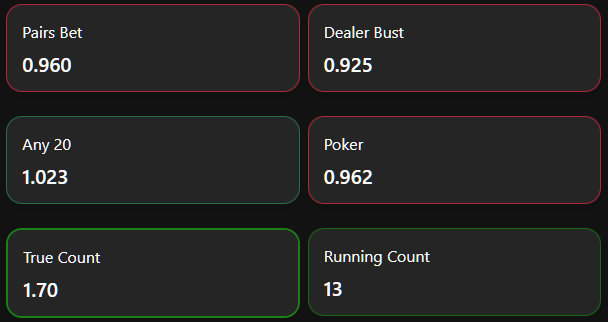
After each submission the panel updates with six values. The Running Count and True Count are not probabilities — they are card-counting metrics. The higher (more positive) these numbers are, the more the remaining deck favors the player over the house. A true count above +5 is a strong signal.
The four side-bet panels — Pairs Bet, Dealer Bust, Any 20, and Poker — display Expected Value (EV) figures. An EV above 1.0 means the bet is statistically in the player's favor at the current deck composition. An EV below 1.0 means the house still has the edge on that side bet — best to skip it that round.